
Download Sparkit – Free Video-to-Images Converter & Merger for Windows, Mac, Android, iOS
Sparkit is a powerful, secure, and intuitive video-to-images converter and merger that transforms your video content into high-quality still frames with precision. Whether you're a content creator, educator, or researcher, Sparkit enables you to extract individual frames from videos, merge them into a single composite image, and even align them with subtitles for enhanced storytelling. With support for auto-caption generation and local subtitle uploads, Sparkit offers unmatched flexibility. The one-click export feature ensures fast, hassle-free saving of images in your preferred format and resolution. Available for Windows, Mac, Android, and iOS, Sparkit is a must-have tool for anyone needing to visualize video content in a static, shareable format.
Effortless Video-to-Image Conversion with Smart Subtitle Integration
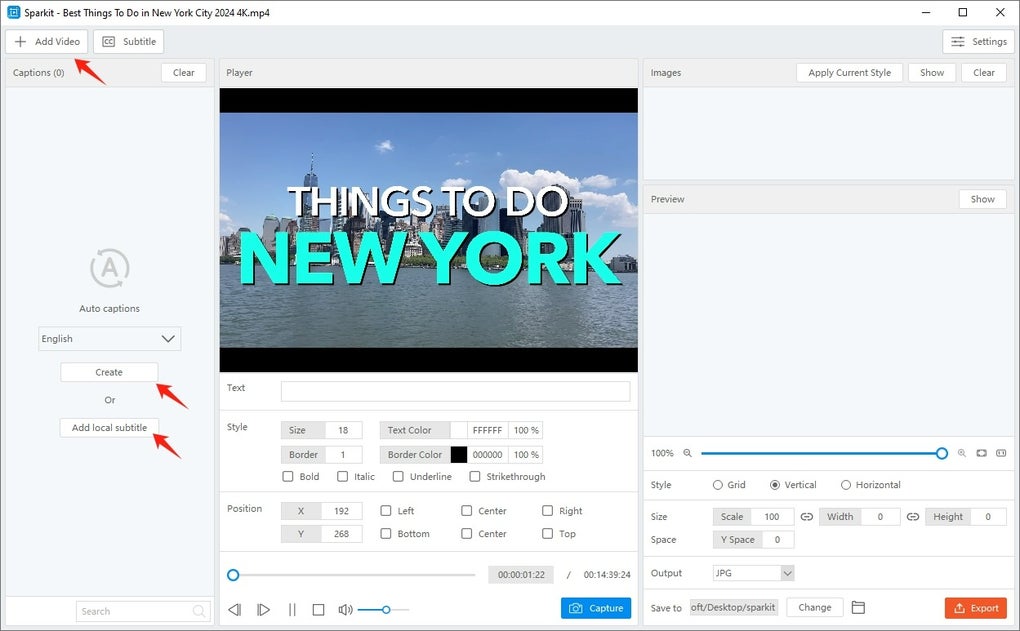
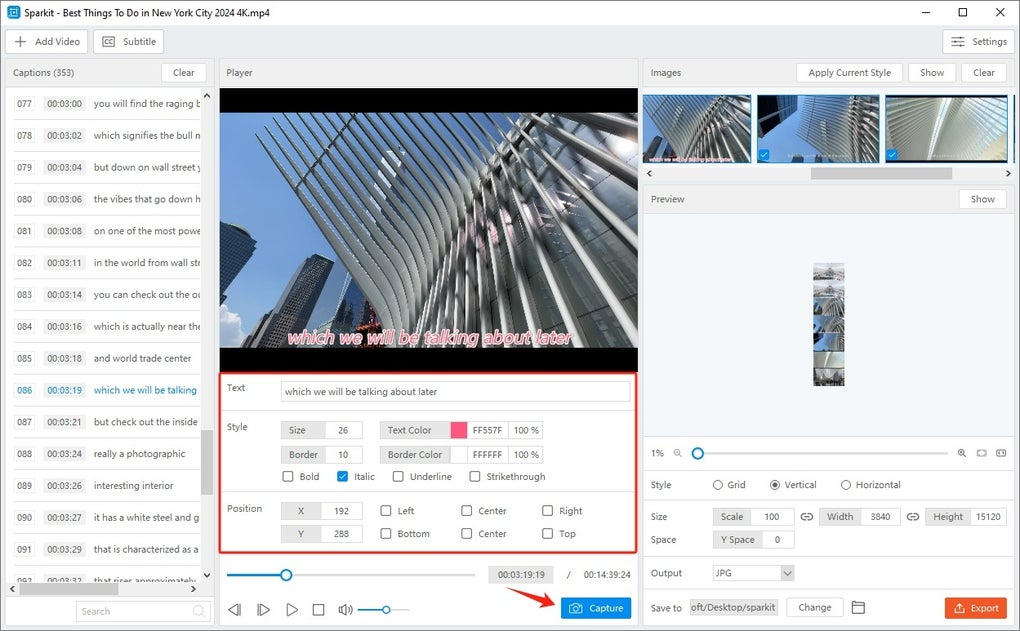
Sparkit stands out in the world of multimedia tools by combining robust video processing with intelligent subtitle handling. At its core, Sparkit allows users to extract individual frames from any video file with remarkable clarity and detail. This feature is especially valuable for content creators who need to pull key moments from long-form videos for social media, presentations, or blog visuals. What sets Sparkit apart is its ability to synchronize extracted images with subtitles—either automatically generated or uploaded from local files like SRT or VTT. This means every still image can be paired with its corresponding spoken text, making the output ideal for educational content, subtitles-based storytelling, or accessibility improvements.
The auto-captioning engine uses advanced speech recognition technology to transcribe audio in real time, ensuring high accuracy even in noisy environments. Users can fine-tune the generated subtitles by adjusting timestamps, correcting errors, or changing language preferences. This level of control ensures that the final image output remains contextually accurate and professionally polished. Whether you're creating a visual summary of a webinar, a timeline of a documentary, or a series of teaching aids, Sparkit ensures each frame is not just visually strong but semantically meaningful. The software also supports batch processing, so you can convert entire videos or multiple clips in one session, saving hours of manual work.
Additionally, Sparkit’s interface is designed with simplicity in mind. You don’t need technical expertise to use it—just drag and drop your video, select your settings, and click “Extract.” The tool handles the rest, delivering crisp, high-resolution images ready for export. With secure local processing (no cloud uploads), your videos remain private and protected. This makes Sparkit a reliable choice for professionals handling sensitive or proprietary content. Whether you're working on a personal project or a client deliverable, Sparkit ensures a seamless, secure, and efficient workflow.
Flexible Image Merging and Custom Export Options
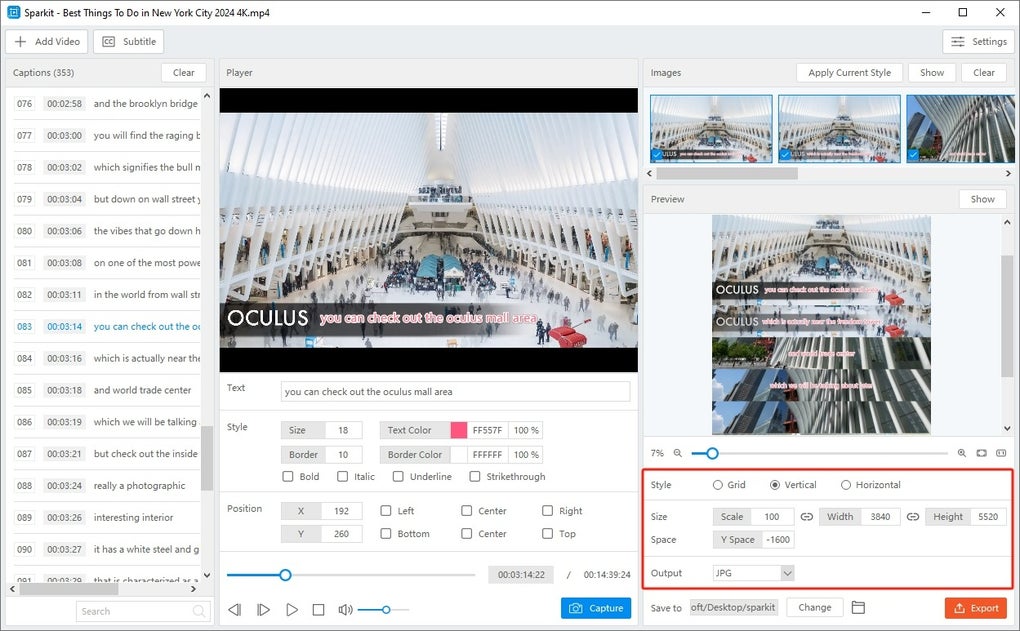
Once you’ve extracted frames from your video, Sparkit doesn’t stop there—it excels at merging those images into a single, cohesive visual narrative. This is where Sparkit truly shines for users who need to present a timeline, a sequence of events, or a visual summary. The merging feature allows you to arrange frames in a grid layout, with customizable columns per row, spacing between images, and alignment options. Whether you want a clean, minimalist poster or a detailed collage for a research paper, Sparkit gives you full control over the composition.
Export flexibility is another major strength. You can choose from multiple formats including PNG, JPEG, and WebP, with support for high-resolution outputs up to 4K. This ensures your final image maintains sharpness whether used online or in print. The software also lets you adjust the canvas size, background color, and border thickness, so your composite image fits perfectly into your design workflow. For instance, educators can generate classroom handouts with labeled frames and subtitles, while marketers can create shareable infographics from product demo videos.
One of the most appreciated features is the one-click export system. After configuring your settings, you can instantly save the final image to your preferred folder with a single click. No need to navigate complex menus or wait for long rendering times.
Sparkit is optimized for speed and efficiency, making it suitable for both quick tasks and large-scale projects. The software also supports automatic updates, ensuring you always have access to the latest features and security patches. Whether you're on Windows, Mac, Android, or iOS, the experience remains consistent and intuitive, making Sparkit a versatile tool across devices.
Why Sparkit Is a Top Choice for Creators and Researchers
Sparkit’s user-friendly interface and powerful features make it a go-to solution for both beginners and advanced users. Its ability to handle complex tasks—like frame extraction, subtitle synchronization, and image merging—without requiring technical know-how is a game-changer. The software is particularly beneficial for content creators who need to repurpose video content into static visuals for platforms like Instagram, Pinterest, or LinkedIn. By converting a 10-minute video into a single, visually rich image, Sparkit helps maximize engagement and content reach.
For researchers and academics, Sparkit offers a powerful way to analyze video data. You can extract frames from interviews, experiments, or field recordings and organize them into a visual timeline for analysis or publication. The subtitle integration ensures that contextual meaning is preserved, which is crucial in qualitative research. Moreover, Sparkit’s compatibility with multiple operating systems means you can use it on your desktop, tablet, or smartphone, giving you the freedom to work from anywhere.
Security is a top priority with Sparkit. All processing happens locally on your device—no video files are uploaded to the cloud. This protects your privacy and ensures compliance with data protection regulations. The software is also lightweight and fast, consuming minimal system resources, which makes it ideal for older devices or laptops with limited RAM. With regular updates and responsive customer support, Sparkit continues to evolve to meet user needs.
Pros and Cons: Is Sparkit Right for You?
- Pros:
- High-quality frame extraction with support for 4K resolution
- Smart subtitle integration with auto-captioning and local file support
- One-click export and fast processing speed
- Flexible image merging with customizable layouts and spacing
- Secure local processing – no cloud uploads
- Available for Windows, Mac, Android, and iOS
- Free to download and use with optional premium upgrades
- Cons:
- Advanced merging features require a premium subscription
- Auto-captioning accuracy depends on audio clarity
- Limited support for non-standard video formats (e.g., AV1)
- Mobile version lacks some desktop-level customization
- Occasional lag on very large video files
Frequently Asked Questions (FAQ)
-
Can I use Sparkit to extract images from any video format?
Sparkit supports common video formats including MP4, MOV, AVI, MKV, and WMV. While it works well with most standard files, very rare or proprietary formats may require conversion before use. We recommend using widely supported codecs like H.264 for best results.
-
Is Sparkit completely free to download and use?
Yes, Sparkit is free to download and use for basic features like frame extraction and simple merging. Advanced tools such as high-resolution exports and custom layouts are available through a premium subscription, which offers a free trial period.
-
Does Sparkit process videos on my device or in the cloud?
All processing is done locally on your device. Sparkit does not upload your videos to any server, ensuring your content remains private and secure at all times.
-
Can I merge images from multiple videos into one composite?
Yes, Sparkit allows you to extract frames from multiple videos and merge them into a single image. Simply import each video, extract the desired frames, and use the merge tool to combine them into a unified layout.
-
Is there a mobile version of Sparkit?
Yes, Sparkit is available for both Android and iOS devices. The mobile app supports core features like frame extraction and basic merging, though advanced customization options are more accessible on desktop versions.
Conclusion: Transform Your Video Content with Sparkit Today
Sparkit is more than just a video-to-image converter—it’s a complete visual storytelling tool that empowers users to extract, organize, and share video moments with ease. Whether you're a content creator looking to boost engagement, a teacher preparing visual aids, or a researcher analyzing video data, Sparkit delivers precision, speed, and security. Its intuitive design, smart subtitle integration, and flexible export options make it one of the most versatile tools in its category.
With support for Windows, Mac, Android, and iOS, Sparkit fits seamlessly into any workflow. The free version offers substantial value, while premium upgrades unlock advanced features for professionals. If you’re ready to turn your video content into powerful, shareable visuals, don’t wait—download Sparkit today and experience the future of visual content creation.
Download Sparkit now and start converting your videos into stunning, high-quality images with just one click.







